A folder of photographs goes in.
A book you would show someone comes out.
Booklibre reads the folder, drops what would weaken the album, lays out every spread, and hands you a draft you can argue with. It runs on your machine, it has no account, and the finished PDF goes to whichever print shop you like.
Free and open source, GPL-3.0. For macOS and Windows.
One run
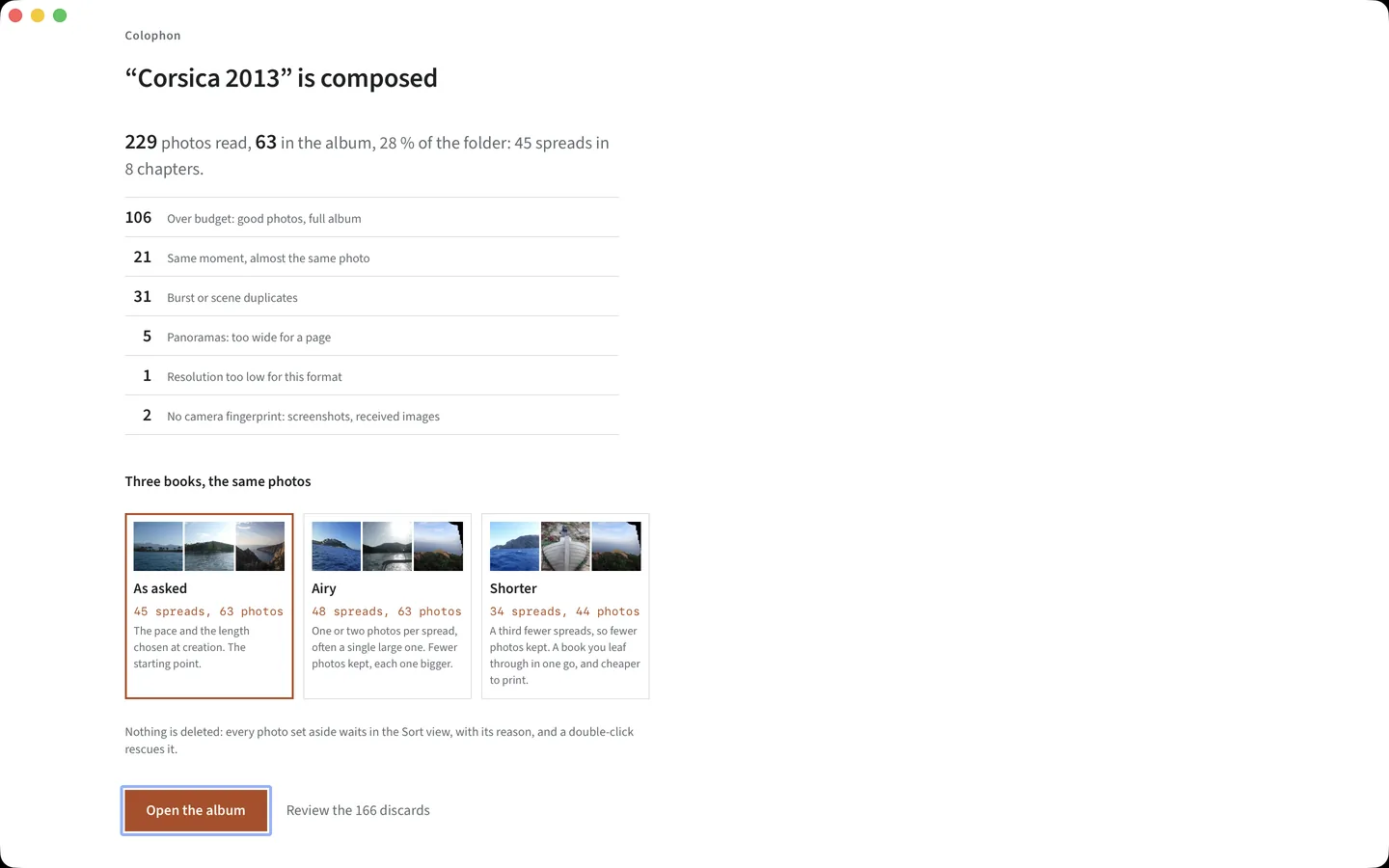
on 50 spreads across 8 chapters, in under a minute, with every discarded frame listed and explained.
- scan
- analyse
- curate
- compose
- export
A 21 × 21 cm album, composed from a holiday folder, untouched by hand.
What it guarantees
An auto-layout is judged on its worst spread.
So the constraints are written as code and checked by a linter that fails the build, rather than left as good intentions. The composer will never:
- put a portrait photograph in a landscape cell, or the reverse
- let a detected face touch a cropped edge, closer than 4 % of the frame
- place two near-duplicates, or two shots of the same scene, on one spread
- open a chapter on a weak frame, or run past the pace you chose without a breathing page
- repeat the same template four times in a row
- retouch a single pixel of your photograph
Fourteen counters check the finished album. Ten judge the composer and fail the audit past their tolerance; four count what a hand placed or what the typeface cannot draw, and only warn. When a correction keeps coming back, it becomes a new counter.
The Sort view
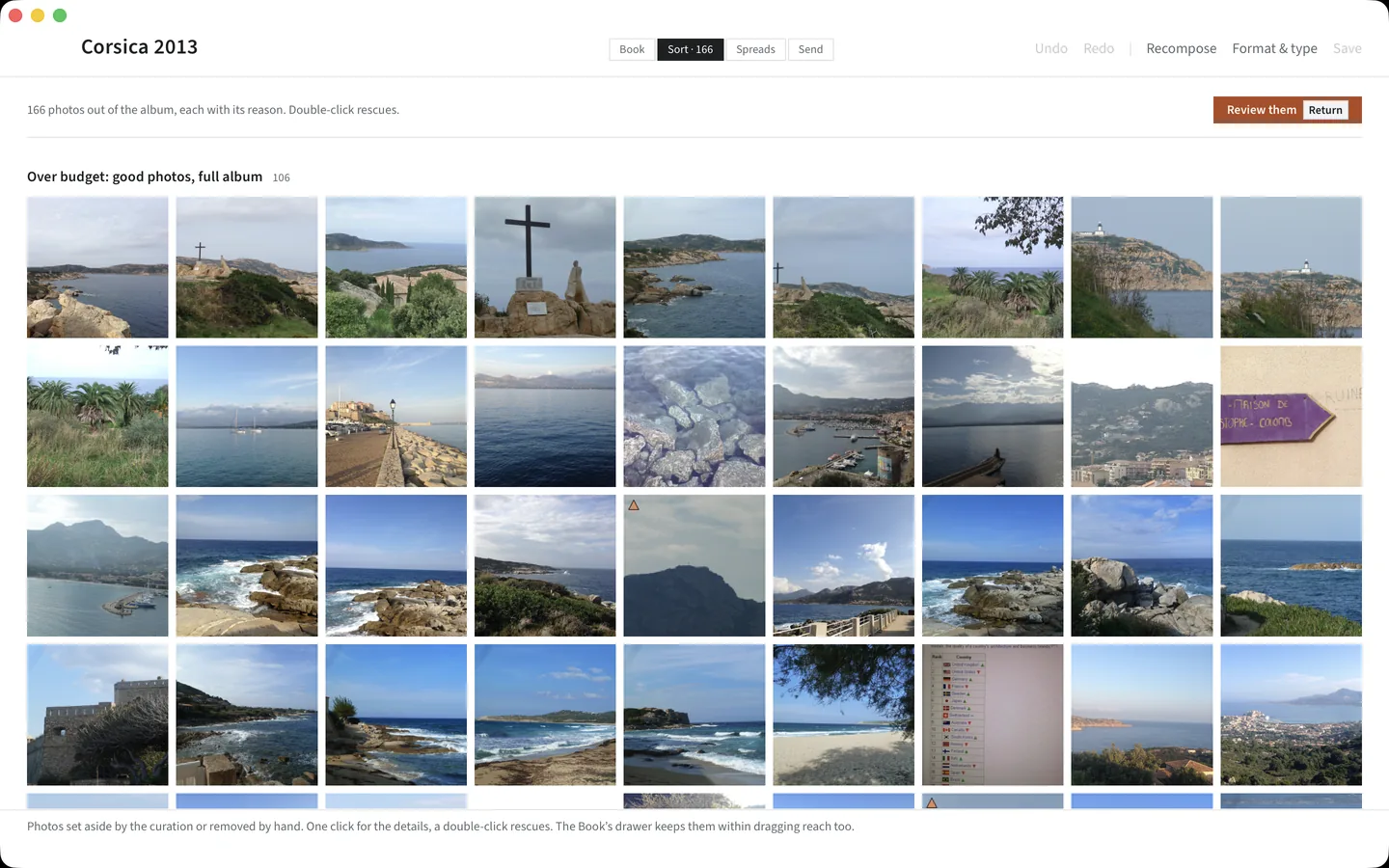
It tells you what it dropped, and why.
Every discarded photograph is shown, grouped by the reason it lost its place: no room left in the book, near-duplicate, another shot of the same scene, too small to print at this size, panorama that does not fit the page.
When it lost to another frame, that frame sits next to it. A double-click puts it back in the book.
This is the part nobody else shows you, and it is the part that makes automatic curation something you can trust rather than something you have to check.
Printing
A plain PDF, at 300 dpi, that any print shop accepts.
No partner you have to use, no watermark, no logo, no barcode of ours on your book. Fonts are embedded, the bleed follows the shop’s own profile, and the preview shows the page at its trimmed size rather than promising a margin the guillotine will take.
Before you send anything, a preflight check runs: pagination, bleed on each edge, colour space, embedded fonts, effective resolution cell by cell, safe zone. Every message names the spread and the cause in plain language and tells you the gesture that fixes it.
Nothing ever fails silently, least of all on the last screen of the journey.
colophon --prevol --profil cloudprinter -o my-albumWhat it does not do
No account, no cloud, no telemetry, ever.
There is no server to send your photographs to. Pull the network cable and everything still works, the export included. The one call Booklibre makes is a question at launch, to GitHub, about whether a newer version exists; it carries nothing of your photographs and nothing of your album, and Preferences turns it off.
The album is a folder on your disk with a readable JSON file in it, which you can repair in a text editor. Your original photographs are read and never modified.
Get it
Booklibre 1.0.1
Download, open, point it at a folder. No account. The macOS app is signed and notarized by Apple, so it opens like any other. The Windows installer is not signed yet: SmartScreen asks once, as the README shows. Version 1.0.1 still carries the project’s former name, Colophon: the next version takes the new one.
Linux should build from source, but nobody has checked the app there yet.
Questions
The ones people actually ask.
Can I print it wherever I want?
Yes. The output is a standard PDF at 300 dpi and there is no printing partner this software needs you to use. Print it at a shop, at a lab, or at home.
Do my photographs go into a cloud?
No. There is no server. Booklibre works with the network switched off, and it will keep working the day this project stops being maintained.
Is this AI?
No language model, no prompt, no cloud inference. Perceptual hashes for duplicates, a sharpness measure, exposure, and face detection so heads do not get sliced. All local, all explained, all overridable. If an AI mode ever ships it will use your own key, stay optional, and never decide anything by itself.
Why not just use InDesign or Scribus?
Because they start from an empty page, and the empty page is not the hard part. Choosing 150 photographs out of 600 and placing them so the book reads is the hard part. If you would rather design every spread by hand, InDesign is the better tool and this one is not trying to replace it.
What about my HEIC files?
On macOS, read natively through the system decoder, ImageIO. Nothing to install. On Windows and Linux they are not decoded yet: counted and named on screen, never silently dropped.
How do you make money?
Not from this. The software is free and stays free, and so does the full-resolution PDF export, offline and without an account.
Windows? Linux?
The release chain builds a Windows installer, but nobody has run the app on a real Windows machine yet, and HEIC, RAW and the Apple Photos import stay on macOS. Linux has no installer: it should build from source, but nobody has checked the app there yet.
CMYK, layflat, hard covers?
Not CMYK, not layflat. Colour space and binding live in the printer profile, so they arrive one profile at a time, when a real print shop asks for them. The Cloudprinter profile already renders the flat cover sheet of its hardcover, spine included.